Building an Automated Google Ads Audit System with Python
I recommend developing a Python-powered Google Ads Audit System that automatically collects campaign data, evaluates performance against advertising best practices, detects potential issues, and generates detailed Excel audit reports.
You don't need advanced programming experience to get started. We'll build the system step by step, beginning with sample Google Ads data and gradually integrating it with a live Google Ads account.
Your final project
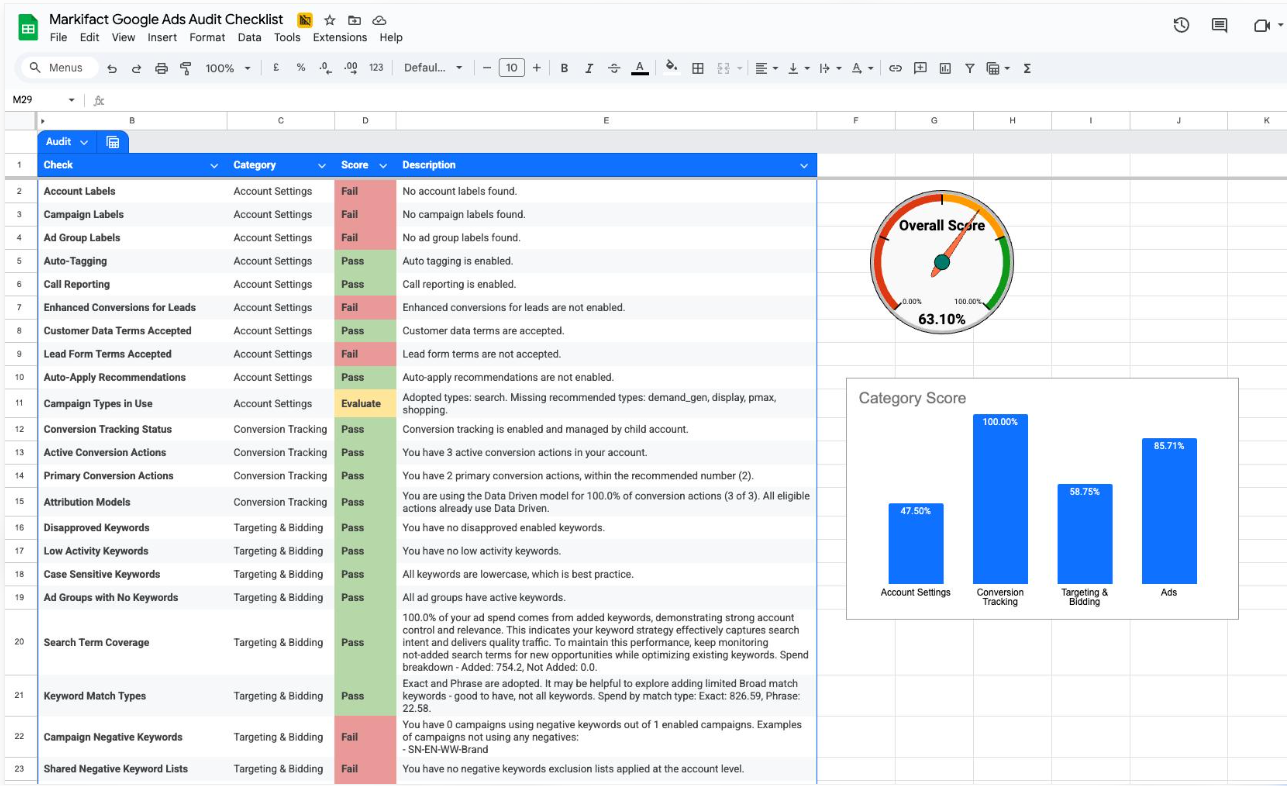
Automated Google Ads Campaign Auditor
The system will:
- Retrieve campaign performance data.
- Check campaign budgets and spending.
- Identify high-cost campaigns.
- Detect campaigns with zero conversions.
- Flag low CTR and high CPC.
- Check campaign configuration against your rules.
- Generate an Excel audit report.
- Send alerts when problems are detected.
1. Technology stack
You will use the following tools. Most have free development options, although Google Ads API access has account eligibility and access requirements.
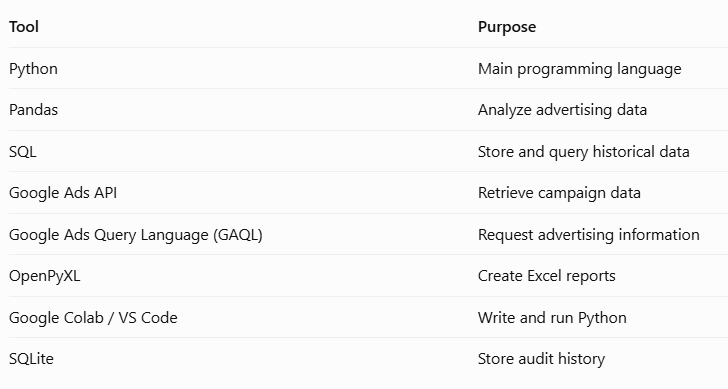
Learning priority: Python → Pandas → Google Ads API → GAQL → SQL → Automation.
2. Eight-week learning roadmap
Week 1 – Python fundamentals (Beginner)
- Variables and data types
- Lists and dictionaries
- If/else conditions
- Loops
- Functions
- Reading CSV files
Practical exercise: Read a CSV file containing Google Ads campaign data.
Week 2 – Pandas and data analysis
- DataFrames
- Filtering records
- Calculating CPC, CTR and CPA
- Handling missing values
- Identifying duplicate records
Practical exercise: Find campaigns spending money without generating conversions.
Week 3 – Advertising audit rules
- Budget thresholds
- Performance thresholds
- Conversion tracking checks
- Campaign status checks
- Rule-based auditing
Practical exercise: Create a campaign health-check script.
Week 4 – SQL and SQLite
- CREATE TABLE
- INSERT
- SELECT
- WHERE
- GROUP BY
- JOIN
Practical exercise: Store daily campaign performance and compare results over time.
Week 5 – Google Ads API
- Google Ads developer token
- Google Cloud project
- OAuth 2.0 authentication
- Google Ads client library
- GAQL queries
Practical exercise: Retrieve actual campaign performance data.
Week 6 – Build the audit engine
- Combine API data with Python
- Apply audit rules
- Identify anomalies
- Generate audit findings
Practical exercise: Audit campaigns automatically.
Week 7 – Reporting and alerts
- Excel report generation
- Audit summaries
- Email notifications
- Historical comparisons
Practical exercise: Store daily campaign performance and compare results over time.
Conclusion: Don't start with Google Ads API immediately. First make your CSV-based audit program work. Once you understand the calculations and rules, API integration will be much easier.
Contact
Contact Us
Our Address
#490-491, Housing Board, Ambala Cantt, IN 133001
Email Us
contact@indexwebsolution.com
Call Us
+91 7988618308