Why Every Online Course Needs a Marketing Funnel
Launching an online course involves more than creating valuable lessons and uploading them to a learning management platform. You also need a reliable way to attract potential students, build relationships with them, communicate the value of your course, and encourage them to enroll.
Many course creators struggle with sales because they focus heavily on course development but overlook the customer journey. They publish social media posts, run advertisements, or send occasional emails without connecting these activities into a structured marketing process.
A course launch funnel solves this problem by guiding potential students through a series of steps, from discovering your course to making a purchase and becoming an engaged learner.
A well-designed funnel can combine Facebook and Instagram advertising, a dedicated landing page, automated email marketing, and a course delivery platform such as Thinkific.
GoHighLevel or Mailchimp can manage the email nurturing process, helping you follow up with leads consistently without manually contacting every prospect.
In this guide, we will explore how to build a complete course launch funnel, explain the purpose of each stage, and show how to connect the different tools into a practical marketing system.
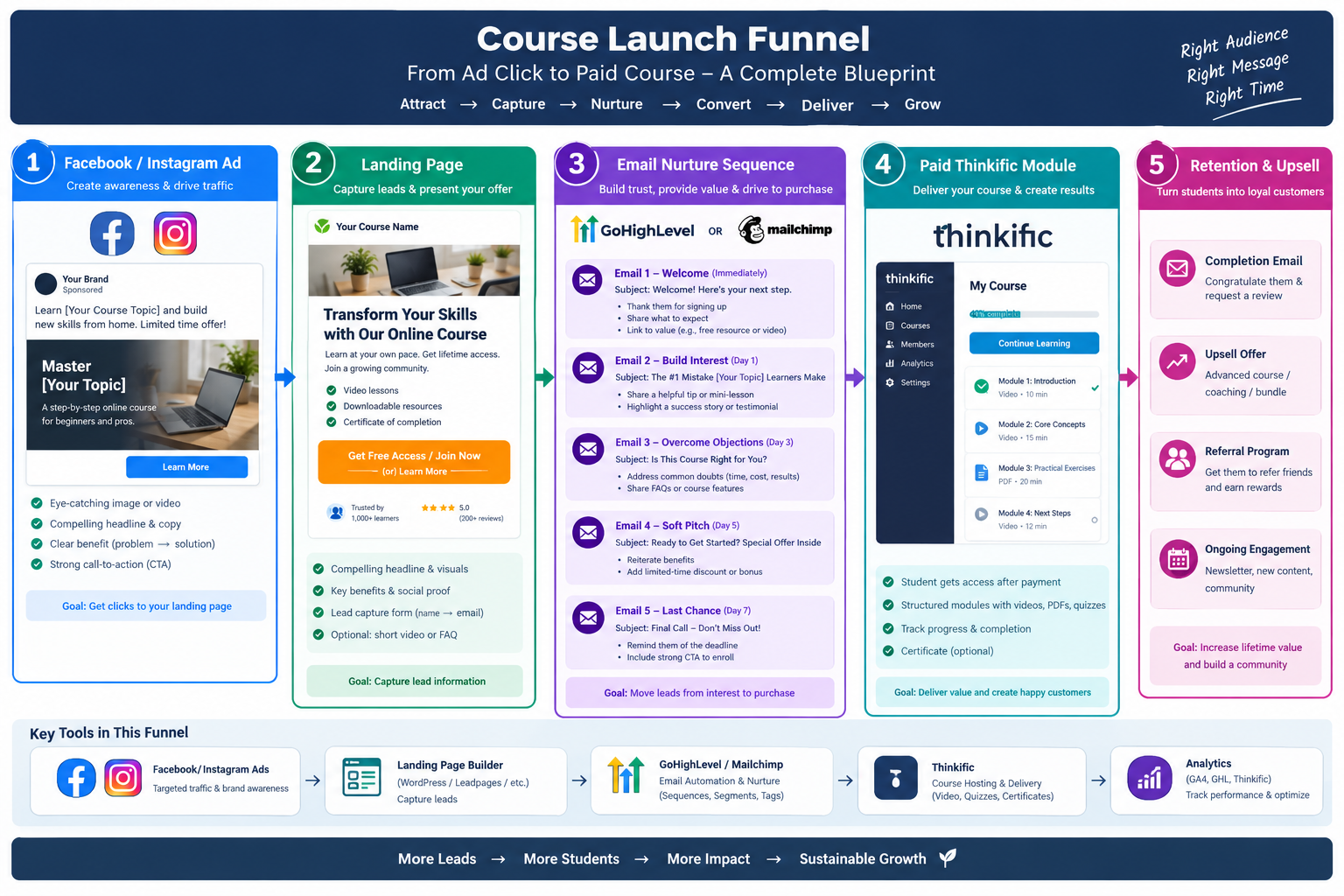
What Is a Course Launch Funnel?
A course launch funnel is a structured marketing process that moves potential students from initial awareness to enrollment in a paid online course.
Instead of expecting someone to purchase immediately after seeing an advertisement, the funnel introduces your offer, captures contact information, provides useful information, addresses objections, and presents a clear opportunity to buy.
A typical course launch funnel contains five main stages:
- Attract: Reach potential students through Facebook and Instagram advertisements.
- Capture: Direct visitors to a landing page where they can exchange their contact information for a valuable resource or offer.
- Nurture: Send automated emails that educate leads and demonstrate the value of your course.
- Convert: Direct interested prospects to a Thinkific sales or checkout page and enroll them after successful payment.
- Retain and grow: Help students complete the course, gather feedback, and introduce relevant advanced courses or services.
Each stage has a specific purpose, and the information gathered throughout the process helps you understand which marketing activities generate the best results.
For example, a business coach selling an online course for small business owners might offer a free business planning checklist. Visitors who download it receive a series of educational emails before being invited to purchase the complete training program.
The result is a more organized customer journey that can be measured, improved, and scaled.
Stage One: Attract Potential Students Through Facebook and Instagram Ads
The first stage of your funnel is attracting the right audience.
Facebook and Instagram advertisements can help course creators reach people based on factors such as location, interests, and other available audience targeting options. The best approach is to focus on people who are likely to benefit from the course rather than simply maximizing the number of clicks.
Define your target audience
Before creating an advertisement, identify the people most likely to purchase your course.
Consider the following questions:
- What problem does your course solve?
- Who experiences this problem?
- What result does your audience want to achieve?
- What prevents them from achieving that result?
- What would make them interested in learning from you?
For example, if you sell a course about email marketing, your audience might include small business owners, freelancers, consultants, and marketing professionals who want to generate more leads.
Understanding these needs will help you create relevant advertising messages.
Create an engaging advertisement
A strong advertisement usually contains four elements:
Attention-grabbing headline: Identify a problem or desired outcome.
Relevant visual: Use an image, short video, or demonstration that communicates the benefit of your offer.
Clear value proposition: Explain what the audience can learn or achieve.
Call to action: Tell visitors what to do next.
For example, an advertisement could promote a free guide titled "The Small Business Email Marketing Checklist."
The advertisement might explain that the guide helps business owners organize their email marketing activities and improve their campaigns.
Instead of asking a cold audience to purchase an expensive course immediately, you invite them to take a smaller first step.
Track advertising performance
Use campaign-specific URLs with UTM parameters to identify which advertisements generate landing page visits, leads, and purchases.
Install appropriate tracking tools, such as Meta Pixel and conversion tracking, where permitted and configured correctly. Respect applicable privacy requirements and obtain consent where necessary.
Monitor metrics such as click-through rate, cost per lead, landing page conversion rate, and eventual course sales.
The objective is not merely to generate traffic. It is to attract potential students who are genuinely interested in your course.
Stage Two: Build a Landing Page That Converts Visitors into Leads
Once someone clicks your advertisement, they should arrive at a landing page designed around one primary action.
The page should continue the same message presented in the advertisement. If the ad promises a free checklist, the landing page should clearly explain the checklist and make it easy to access.
Sending visitors to a general homepage can introduce unnecessary distractions and reduce the likelihood that they complete the intended action.
Stage One: Attract Potential Students Through Facebook and Instagram Ads
The first stage of your funnel is attracting the right audience.
Facebook and Instagram advertisements can help course creators reach people based on factors such as location, interests, and other available audience targeting options. The best approach is to focus on people who are likely to benefit from the course rather than simply maximizing the number of clicks.
Essential landing page elements
1. A benefit-focused headline
Tell visitors what they will gain.
For example: "Learn How to Build an Email Marketing System for Your Small Business."
2. A clear explanation of the offer
Explain what the free resource includes and how it will help the visitor.
3. A list of benefits
Highlight practical outcomes, such as saving time, organizing campaigns, or learning a repeatable process.
4. A simple lead capture form
Collect only the information you need. A name and email address may be sufficient for a free resource.
5. Trust-building elements
Include relevant credentials, genuine testimonials, examples of your work, or other evidence that supports your credibility.
6. A prominent call to action
Use clear wording such as "Get the Free Guide" or "Access the Training."
What happens after form submission?
When a visitor completes the form, your marketing system should create or update their contact record and place them into the appropriate email automation workflow.
You can build your landing page using WordPress, a dedicated landing page builder, or a supported GoHighLevel landing page feature.
If you use WordPress, you can connect your form to GoHighLevel or Mailchimp through a supported integration, connector, or automation service.
After submission, display a thank-you page that confirms the request and explains what happens next. For example, tell visitors to check their inbox for the free guide.
This transition reassures visitors that their information was submitted successfully and prepares them for the next stage of the funnel.
4. Stage Three: Nurture Leads with GoHighLevel or Mailchimp
Not every lead is ready to buy immediately.
Some visitors may want to learn more about your expertise, understand the benefits of your course, or compare different solutions before making a purchase.
Email nurturing allows you to continue the conversation after the visitor leaves your website.
GoHighLevel and Mailchimp can both support email marketing workflows, although their features, integrations, pricing, and automation capabilities differ.
GoHighLevel is particularly useful when you also need CRM functionality, sales pipelines, and lead management. Mailchimp can be a suitable option for businesses focused primarily on email campaigns, audience management, and marketing automation.
Choose the platform that fits your workflow and budget.
Example: A seven-day email nurture sequence
A practical email sequence might look like this:
Email 1: Welcome and deliver the resource — Immediately
Thank the subscriber for joining and provide the promised checklist, guide, or training resource.
Explain what they can expect from your upcoming emails.
Email 2: Deliver a quick win — Day 1
Share a useful tip that the subscriber can implement immediately.
For example, explain how to improve an email subject line or organize a basic marketing campaign.
The objective is to demonstrate your expertise by providing real value.
Email 3: Explain a common mistake — Day 3
Discuss a frequent problem your audience experiences and explain how to avoid it.
You might show how inconsistent follow-up can cause businesses to lose potential customers.
Email 4: Address objections — Day 5
Explain how your course helps students overcome common challenges.
Address reasonable concerns about time, skill level, course structure, or implementation.
Include genuine testimonials or case studies when available.
Email 5: Present the paid course — Day 6
Introduce the course, explain what students will learn, describe the intended outcomes, and provide a link to the sales page.
Make the offer clear without exaggerating the results students can expect.
Email 6: Answer frequently asked questions — Day 7
Explain the course format, access arrangements, prerequisites, support options, and other important purchasing details.
Invite interested subscribers to review the offer.
You can extend the sequence with additional educational messages, live training invitations, or a final reminder when appropriate.
Any deadline or limited-time discount should be genuine rather than artificially presented as expiring.
Segment leads for better results
Not every subscriber should receive exactly the same messages.
You can create segments based on interests, course topics, engagement, or actions taken on your website.
For example, someone interested in beginner training may need different content from someone looking for advanced professional development.
Use relevant tags, audience fields, or segments to organize these contacts.
Also ensure that unsubscribed contacts are suppressed from marketing emails and that your workflow follows applicable consent and email marketing requirements.
Stage Four: Convert Leads into Paying Students Through Thinkific
After nurturing your leads, the next step is to turn interested prospects into paying students.
Thinkific provides tools for hosting online courses, organizing lessons, managing student access, and delivering educational content.
Your email sequence should direct interested subscribers to a course sales page or checkout page where they can review the offer and complete their purchase.
Create a compelling course offer
Your sales page should explain:
- Who the course is designed for.
- Which problem it addresses.
- What students will learn.
- How the modules are organized.
- What resources and support are included.
- The course price and payment terms.
- Any applicable refund policy.
- How students receive access after purchasing.
A clear course structure can help potential students understand the value of the training.
For example, an email marketing course might contain modules on audience research, lead capture, email copywriting, automation setup, and campaign measurement.
Use realistic learning outcomes and avoid promising guaranteed income, business growth, or other results that depend on factors beyond the course itself.
Connect payment to course enrollment
The most important operational step is ensuring that successful payment leads to the correct course enrollment.
The intended workflow is:
- A lead clicks the course link in an email.
- The lead visits the Thinkific sales or checkout page.
- The lead completes the payment process.
- The payment is confirmed.
- The student receives access to the purchased course.
- A purchase confirmation email is sent.
- The contact record is updated in GoHighLevel or Mailchimp.
- The student is removed from the promotional sales sequence.
The exact integration method depends on your Thinkific plan, checkout configuration, and the available integrations.
Where a direct integration does not support your required workflow, a supported automation connector such as Zapier or Make may help transfer purchase information between systems.
Configure the workflow around a verified successful-payment event rather than simply a checkout-page visit.
Test the complete process with a test purchase or another supported testing method before launching the funnel. Confirm that the correct student receives access, the purchase is recorded, and promotional emails stop when appropriate.
Also consider failed payments, refunds, duplicate contact records, and cancelled orders so that your automation handles these situations correctly.
Stage Five: Improve Student Engagement, Retention, and Upsells
A successful course launch does not end when a student makes a purchase.
Students who understand how to get started, make progress through the material, and receive appropriate support are better positioned to benefit from the course.
A post-purchase automation sequence can help create a positive learning experience.
Welcome new students
Send a welcome email containing login instructions, course access details, and a short explanation of where to begin.
Introduce the first module and recommend a realistic learning schedule.
If appropriate, include links to support resources or a community where students can ask questions.
Encourage course completion
Send helpful reminders that encourage students to continue learning.
For example, an email might explain the practical exercise associated with the next module or suggest a small milestone to complete during the week.
Where course progress information is available through your integration, use it to make these messages more relevant.
Avoid sending repeated reminders to students who have already completed the relevant activity.
Request feedback and testimonials
After students have had a reasonable opportunity to experience the course, invite them to share their feedback.
Ask what they found useful, what could be improved, and whether they would recommend the course to others.
Request permission before publishing identifiable testimonials, and present feedback accurately.
Introduce relevant additional offers
Students who complete a beginner course may be interested in an advanced course, coaching package, practical workshop, or related service.
For example, someone who purchases a basic email marketing course might later be interested in advanced automation training.
Present additional offers when they are relevant to the student's needs. Avoid overwhelming new customers with immediate upsells before they have had an opportunity to use the product they purchased.
A thoughtful retention strategy can improve the customer experience while creating opportunities for repeat business.
Measure and Optimize Your Course Launch Funnel
A funnel should be treated as an ongoing system that improves through measurement and testing.
Track performance at each stage so you can identify where potential students leave the process.
Important funnel metrics
Advertising performance: Measure impressions, clicks, click-through rate, and cost per click.
Lead generation: Track landing page conversion rate and cost per lead.
Email marketing: Monitor delivery, clicks, unsubscribes, and conversions. Email opens can be less reliable because of privacy features and automated image loading.
Course sales: Measure the number of purchases, conversion rate from leads to customers, and revenue generated.
Profitability: Compare revenue with advertising spend, platform fees, payment processing, and other relevant costs.
For example, if an advertisement generates many clicks but few sign-ups, review the landing page headline, offer, audience match, and page loading speed.
If leads sign up but do not purchase, examine the email content, course positioning, sales page, pricing, and checkout experience.
If many people purchase but struggle to complete the course, improve onboarding, course navigation, lesson structure, and student support.
Test one meaningful change at a time whenever practical, and allow enough data to accumulate before drawing conclusions.
Common Course Launch Funnel Mistakes to Avoid
Several preventable mistakes can reduce the effectiveness of an otherwise well-designed funnel.
Sending all traffic to the homepage: Use a dedicated landing page aligned with the advertisement.
Making the initial offer too complicated: Give visitors one clear next step.
Sending too many promotional emails: Balance sales messages with useful educational content and respect subscriber preferences.
Failing to connect payment and enrollment: Verify the entire transaction-to-access workflow before launch.
Continuing sales emails after purchase: Update customer records and exit buyers from the relevant promotional sequence.
Ignoring mobile users: Test advertisements, landing pages, forms, and checkout pages on mobile devices.
Tracking only leads instead of sales: Evaluate the quality of leads by measuring how many become paying students.
Neglecting post-purchase support: Help students get started and progress through the course.
Addressing these issues can make the funnel more dependable and easier to scale.
Recommended Technology Stack for Your Course Launch Funnel
| Funnel component | Recommended tool | Primary purpose |
|---|---|---|
| Traffic generation | Facebook and Instagram Ads | Attract potential students |
| Landing page | WordPress or GoHighLevel | Capture leads |
| Email automation and CRM | GoHighLevel or Mailchimp | Nurture contacts and manage follow-up |
| Course hosting | Thinkific | Deliver lessons and manage students |
| Integration | Native integration, Zapier, or Make | Connect systems where supported |
| Analytics | Google Analytics and relevant ad tracking | Measure traffic and conversions |
Before subscribing to a platform or purchasing an integration, verify that the specific features you need are available under your chosen plan.
For a business that needs a CRM, sales pipelines, landing pages, and marketing automation, GoHighLevel may be the more comprehensive starting point.
For a creator who already has a website and primarily needs email campaigns and subscriber management, Mailchimp may be sufficient.
Thinkific can remain the central platform for course delivery regardless of which email marketing platform you choose.
Conclusion: Turn Your Course into a Repeatable Sales System
A well-structured course launch funnel connects advertising, lead generation, email nurturing, payment, enrollment, and student engagement into one coordinated process.
Facebook and Instagram help attract potential students. A dedicated landing page captures their information. GoHighLevel or Mailchimp delivers relevant email follow-ups. Thinkific provides the learning environment and course access. Post-purchase automation helps students get started, complete their training, and discover relevant additional offers.
The most important principle is to design the funnel around the customer's journey rather than treating each marketing activity as a separate task.
Start with one course, one clearly defined audience, one lead magnet, and one email nurture sequence. Test every integration, measure the results, and improve the stages that create the most friction.
With a reliable foundation in place, you can gradually expand your advertising, introduce new courses, and build a more sustainable online education business.
Ready to build your course launch funnel? Map the customer journey first, configure the tools, test the automation from initial sign-up through successful payment, and then launch with confidence.
Contact
Contact Us
Our Address
#490-491, Housing Board, Ambala Cantt, IN 133001
Email Us
contact@indexwebsolution.com
Call Us
+91 7988618308